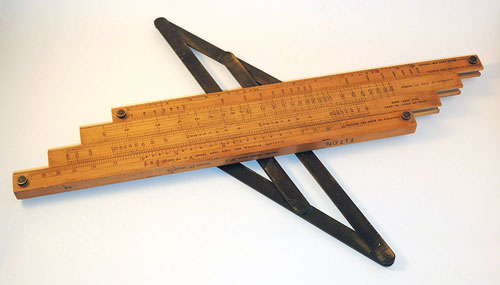
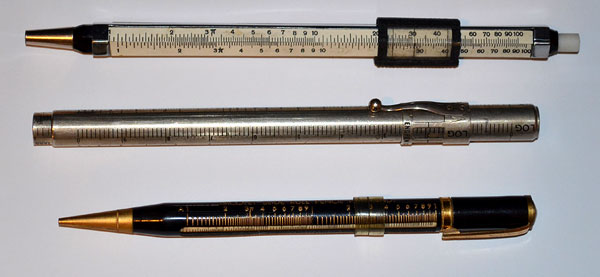
Check the latest addition to the History of Computing exhibition at the Possibly Interesting web site: Michaelis’s concrete calculator (well, actually, Kvasnicka’s version of it).

Nathan Zeldes blogs on everyday product design
Check the latest addition to the History of Computing exhibition at the Possibly Interesting web site: Michaelis’s concrete calculator (well, actually, Kvasnicka’s version of it).

The key idea of Human Engineering is to design the product to fit the humans using it. Makes sense? Sure does, but there are also cases of the opposite approach; Select the human to fit the task or the product!
Obvious examples abound in sports, as with the physical attributes of the horse racing jockey and the basketball player (and while we can’t change the horse’s reaction to a heavier load, we could actually lower the basket if we were designing it to fit the average human…)
A technological example would be the Soviet solution to giving battle tanks a low silhouette: make the tank low, and recruit soldiers of short stature to
crew them.
But an example I really like has to do with the construction of the Cray 1 supercomputer in the 1970s. This elegant computer was built in a round form with the electronics modules on the outside and a central cavity surrounded by the wiring connecting them (the same idea, more or less, is used in the human brain). The wires – huge numbers of them – had to be soldered correctly in the narrow central space, a nightmare task. So how did they manage it?
I once met a veteran of Cray Research at the Computer History museum and he explained it to me. Cray hired women for this task – ones selected for their patience and precision – and they put two of them on each machine: a tall girl to solder at the top of the structure and a short one to work the bottom. Unbelievable? Look at these photos!


Everyone knows that the QWERTY keyboard layout sucks, because it carries a legacy from the early typewriter days; still, we’re all locked into its use and live in oblivion of what we’re missing. But we have another legacy from mechanical typewriters that is hard to forget because it bites us daily. i REFER TO THE cAPS lOCK KEY.
It is interesting to trace the history of this design infamy. Originally, it made a lot of sense: in a mechanical typewriter the Shift keys did just that: they shifted the type mechanism vertically so the type bars would hit the paper with the uppercase letters; and the Shift Lock key would keep the keys locked in this position. This key had to sit right above the Shift key, because it physically latched it in a depressed position; hitting Shift again would release the lock. It was very easy to see (and feel) whether Shift was locked or not, because both keys would be depressed when the lock was engaged. The photos below are from an antiquated Royal typewriter; you can see how the Lock key holds down the Shift key on the right (and note the quaint caption on the latter key – Shift / Freedom, in allusion to releasing the Lock).

Early computer keyboards carried this idea forward, with a Shift Lock or Caps Lock key that had two physical positions: depressed for Lock, and flush with the other keys when released. You could therefore tell when you were in Caps mode, and would notice immediately if you hit the lock accidentally while touch typing. The delightful Commodore 64 had this feature, among others; the photos show a keyboard that came with the collection of homebrew boards described here, from the late 70s.

Later, as keyboard makers sacrificed quality for cheap manufacturing, the more complex and different two-state key was replaced with a momentary key like all the others, with electronics to implement toggle action. Gone was the tactile feedback. Now a simple brush of the finger could accidentally lock you in Caps mode. Worse still, the position of the Lock key next to the left Shift key, which made sense a century ago, was retained – placing this relatively little used key right in harm’s way.
I don’t see manufacturers giving us back the 2-position key (it would cost them a few cents, after all), but the least they could do is move this stupid key to the top row, next to the Scroll Lock, where it will remain unused, unnoticed, and harmless.
So, what can we do about this? Well, one thing we can do is disable the offending key. No need to tear it out – I used KeyTweak, a free key remapping utility, to disable it on my Windows XP system. Good riddance!
Also, if you use MS Word, you may be unaware that depressing Shift+F3 repeatedly will change any selected text to lowercase, uppercase, and sentence case; a very useful feature after YOU’VE ACCIDENTALLY HIT sHIFT lOCK AND CONTINUED TYPING.
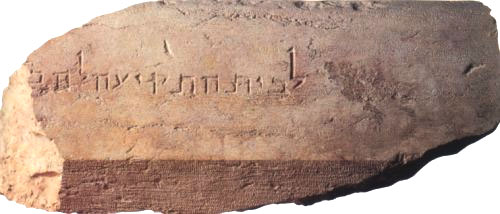
A gem I saw in a museum recently: this is a large cuneiform-inscribed cylinder, maybe 3-4 inches thick, which describes the building activities of king Nebuchadnezzar (better known in the bible for his opposite exploit when he destroyed Jerusalem in 587 BC).

Anyway, in one of those moments of associative memory, it struck me how similar this looked to the contact-studded drum memory devices of the ABC, or Atanasoff-Berry Computer, one of the earliest electronic computers (1941), pictured below at the left. One is also reminded of the magnetic drums that served computers for memory in the 1950s, like the one to its right.

The idea of using a drum for computer storage makes good sense in terms of allowing it to be scanned easily by rotating it; but the Babylonians probably used this form because it allows you to cram much text (and many construction exploits, if you’re a busy king like Nebuchadnezzar, he of the hanging gardens of Babylon) into a relatively compact object.
Also worth noting: The king’s memory cylinder is still readable after more than 26 centuries; so, can you read your 5-1/4 inch floppies any longer?
I recently bought this box of vitamins, and noticed it had a life size outline of the pills’ actual size. This makes sense, since the box is “safety sealed for your protection”, so people can’t see what’s inside before they buy.

This reminded me (wonders of associative memory!) of something rather different, yet following the same idea, from the History of Computing (one of my favorite hobbies). I read about it long ago, but recently was delighted to run across the real thing in a small showcase in the Pergamon museum in Berlin. Back in ancient Mesopotamia, around 9,000 years ago, people had this neat idea of recording commercial transactions with clay tokens. Different shaped tokens might represent a sheep, a jug of beer, or a sack of grain… and so you could represent a loan or tax payment by a collection of tokens (SAP was far in the future then, as was Excel; in fact they had yet to invent writing, so they couldn’t use that for their records). Here is a sample of these tokens:

Then, around 3,500BC in ancient Sumer, the idea occurred that it’s better to keep all the tokens in an “envelope”, a hollow ball of clay that could be signed with the parties’ seals, then fired to harden it. These balls of clay are like an authenticated, signed record; their content can’t be altered without breaking the ball. The museum had some of these balls cracked open, with the tokens still in them:


And since the clay is not transparent, they would sometimes press the tokens on the outside of the ball before sealing them inside – so you’d know what each ball was about. And now we have an accessible copy of the record on the outside, and a sealed version on the inside… just as with the vitamins box!
The next step is obvious in retrospect: who needs the tokens on the inside? So around 3,300BC they dispensed with the tokens, flattened the ball into a clay tablet and made do with the indentations on this, as in the next photo.

And lastly… surely you can see where this is going? Once they could
represent stuff in the real world by abstract marks on a tablet, they were on the path to real writing, starting with pictographs and ending with true cuneiform. Here is another exhibit from the Pergamon, which seems to be halfway through the transition. Wayda go!
More of the science behind this fascinating history can be found on the web site of Prof. Denise Schmandt-Besserat of the university of Texas, a leading researcher of the origins of writing and counting .
When we toured Scotland we visited an ancient building with a curious design feature: it had a staircase that ran in a counterclockwise spiral, opposite to the standard design.
We were told that there are a number of such buildings in Scotland, all built by the same family. Apparently the Kerr family tended to have many left-handed sons, and they built a number of their castles and buildings (notably Ferniehirst Castle, in the 15th century) with counterclockwise spiral staircases, the idea being that a left handed person could defend them more easily (and perhaps also confuse the more common right handed enemies? although it seems that the latter would have some advantage on the attack).
Such a degree of custom design, geared to a genetic trait of one family, is interesting. It is also told that once they committed the architecture this way, they handled the fact that not all their fighting men were lefties by training those who weren’t to fight with the sword in their left hand anyway. Customize the building to the family, then customize the retainers to the building…
“O knob, thou whose perfect roundness doth . . .”
Nah. A poet I’m not. Still, I would if I could, because the round knob is a fast disappearing species, a trend well worthy of lament.

Throughout the 20th century the round control knob was a mainstay of human interface design for electronic devices. With good reason: it was perfectly suited to humans’ major feature, the opposable thumb. You grasped the knob between that thumb and forefinger and you had superb fine control of the knob’s angular position. If the function called for finer control, you just used a fatter knob. At the machine end of this human/machine interface the knob could rotate a switch, a variable capacitor, or a potentiometer – there were many analog devices back then that lent themselves well to rotary control.
Today most of our input components have gone digital, and are either computer controlled or handled by pushbutton switches. This makes sense in some cases, but there are still many situations when a function is intrinsically analog (say, a volume control on a car radio) yet the designers are making the controls digital (say, by using a pair of + and – pushbuttons). This is pure evil from a human engineering perspective: the round knob is much more intuitive, convenient, and faster to boot. And it really was worthy of the name control: it gave the user a sense of controlling the instrument, instead of fighting it…
I’m sure the electronics driving the volume these days are fully digital, but even so a round knob with some D/A conversion is the correct choice. It must also be more expensive to make, because the radio makers – preferring low cost to user experience – increasingly shy away from it.
A riddle: what’s rectangular and flat, can fit in your pocket, and can calculate six-variable functions?
No, not a pocket calculator; I forgot to mention – it has no electronic components whatsoever.
Here, check it out in the latest addition to the HOC collection on my Possibly Interesting web site.
Dominic Tramontana has posted an interesting analysis of how the Reload glyph varies between browsers; take a look! Dominic asked me to post a screen shot I have of NCSA Mosaic, the first graphic web browser developed in 1993 by Marc Andreessen.
The grab I dug up is of a Novell web page, from early 1995. Here it is (click image to see the full page).
Back then, black on gray was the accepted way to write a web page, and the use of the red “book” images was a really impressive touch, I recall. We’ve come a long way…
Reuse is good, right? And the notion conjures in most of us an image of linking code modules. Which is why I was astounded to run into the following case, while touring the beautiful island of Sicily.

Here you see your intrepid tourist in front of the Duomo (cathedral) of Siracusa, the city where Archimedes lived, engineered, and famously died defending his sand drawings. The baroque facade is a late addition (18th century) and nothing to write home about; but to its left there’s something unique and bizarre…
Below, left, is a close-up of the left wall of the Duomo. Note the embedded Doric columns, visible with their abaci and architrave (don’t worry, I had to look that up myself). These are also visible on the inside of the church, as seen in the photo at right.

So what’s going on? Well, the church was built in the 7th century AD. The columns, however, predate it by more than a millennium; they are what’s left of a Greek temple dedicated to Athena, which was built in the 5th century BC. Rather than follow the destroy-and-recycle method often applied to preceding cultures, the Christians reused the framework of the temple as is, filling in the spaces between the columns!